Features
- Ambient house drums Twelve hits at the recorded pitch: kick, rim, snare, clap, hats, toms, shaker, ride, snap, crash. Octave does not transpose the kit.
- Groovebox Four tracks. Each pattern is 1–8 bars of 16th notes (16–128 steps, four steps per beat). The 256-step grid holds four patterns up to four bars, and two patterns at eight bars.
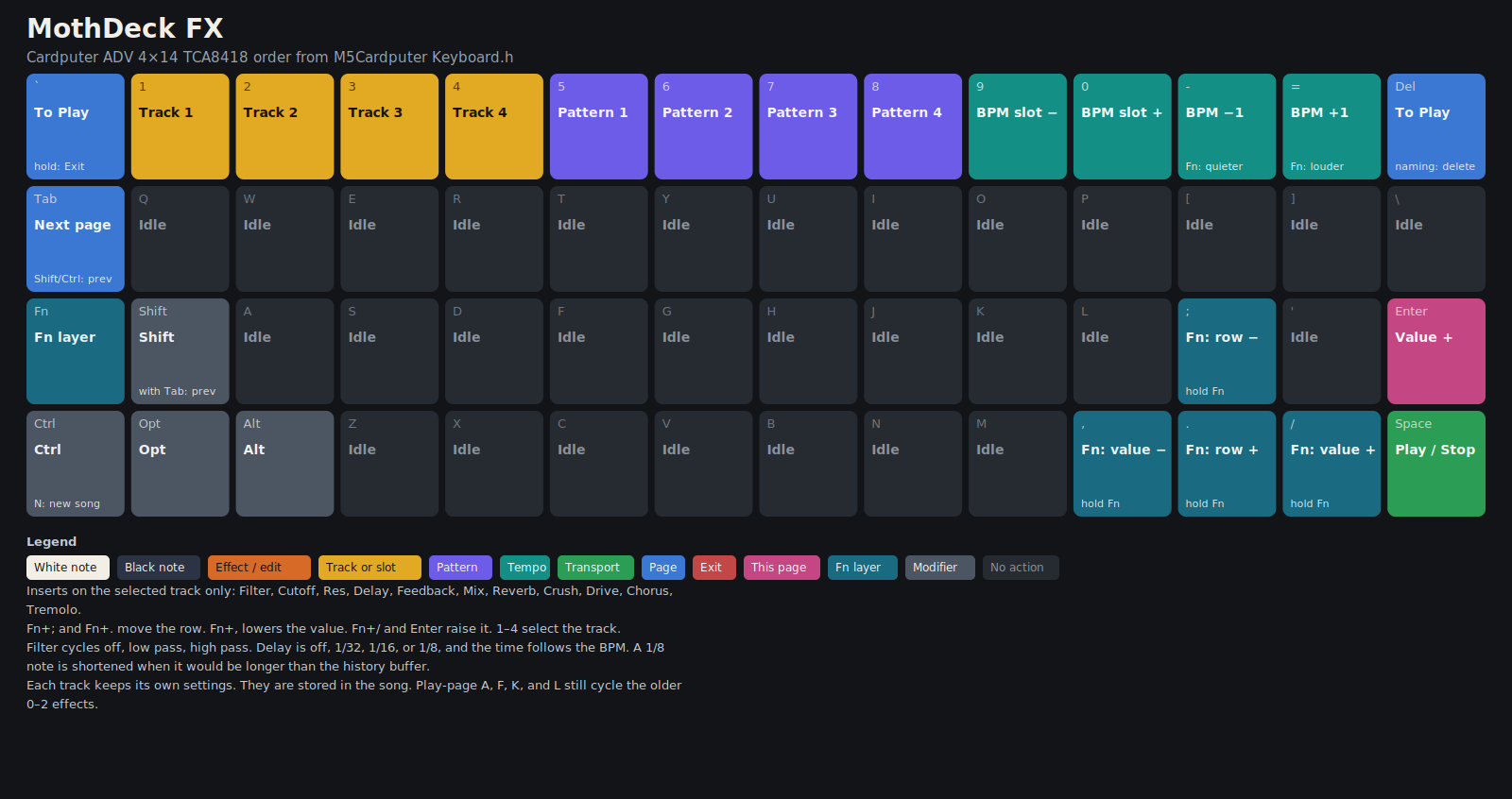
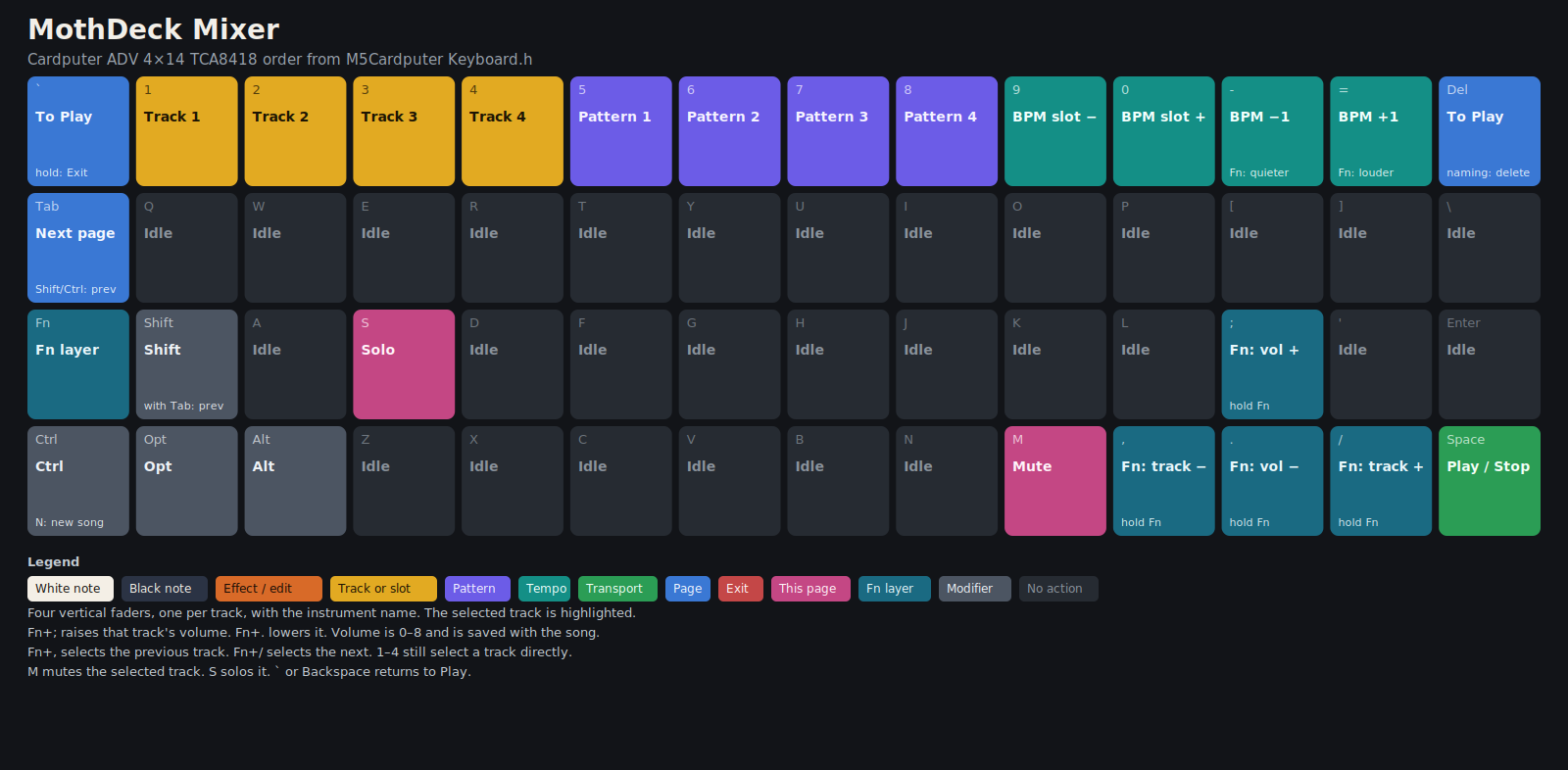
- FX and mixer Per-track filter, delay, reverb, bitcrush, drive, chorus, and tremolo. Mixer faders with mute and solo.
- SD kits and loops Load kits from the card onto Drums. Loops stream in short windows instead of filling RAM.
- Piano roll Play opens on a roll. Time runs across, keys down the left, and a note is a block 1–4 steps long. Enter returns to the 16-step strip. Patterns are still 1–8 bars.
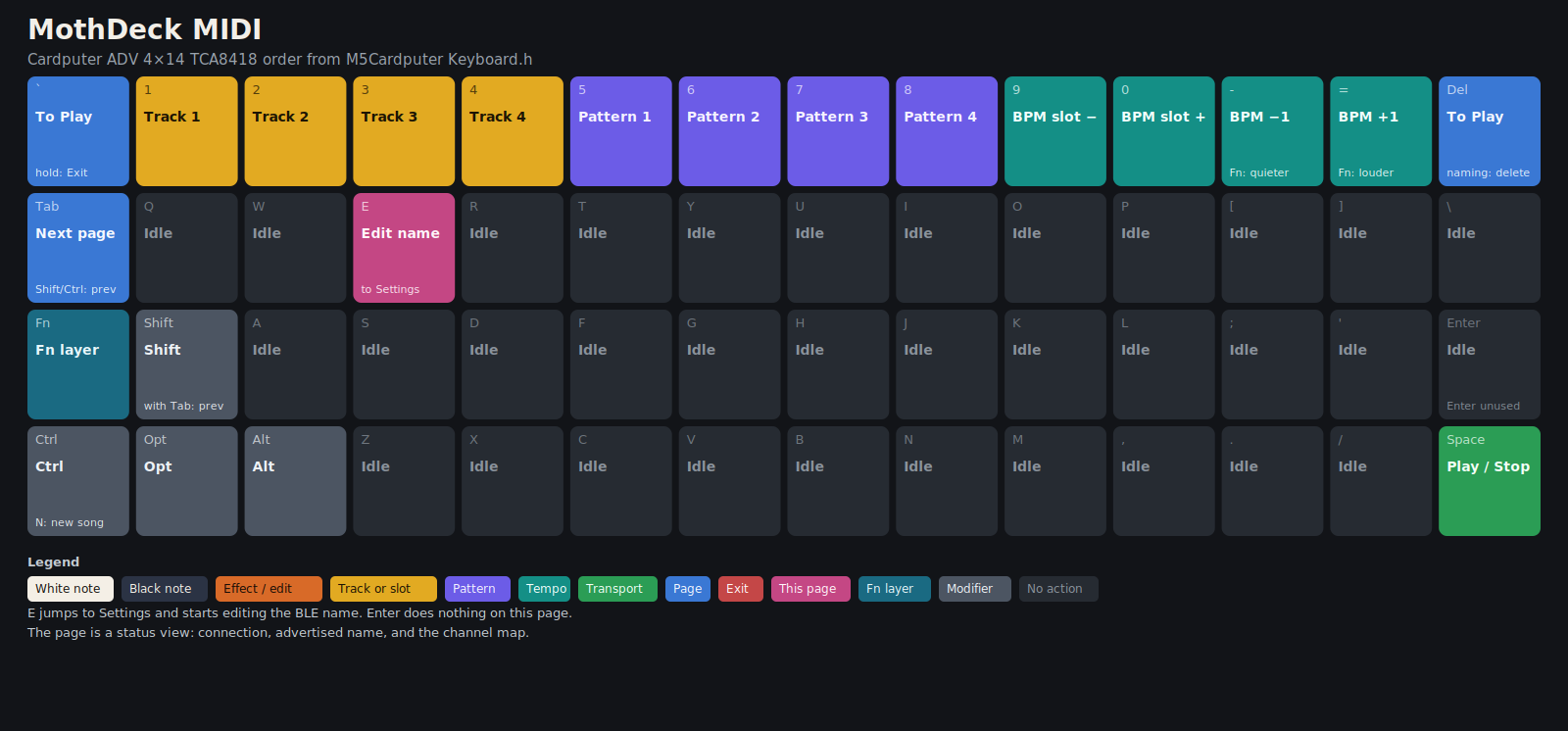
- BLE and USB MIDI The stack's memory is reserved at boot, so turning it on always works. Advertising stays off until Settings. The air name is Mothdeck. The USB port is a MIDI device of the same name, next to the serial port. Unload BLE frees that memory for large loops on the next boot. Notes on channels 1–4 play the four tracks, and they are stored only while Rec is on. Clock, Start, Continue, Stop, and Song Position follow an MPC. Forget an old MothDeck bond on the MPC before pairing this name.
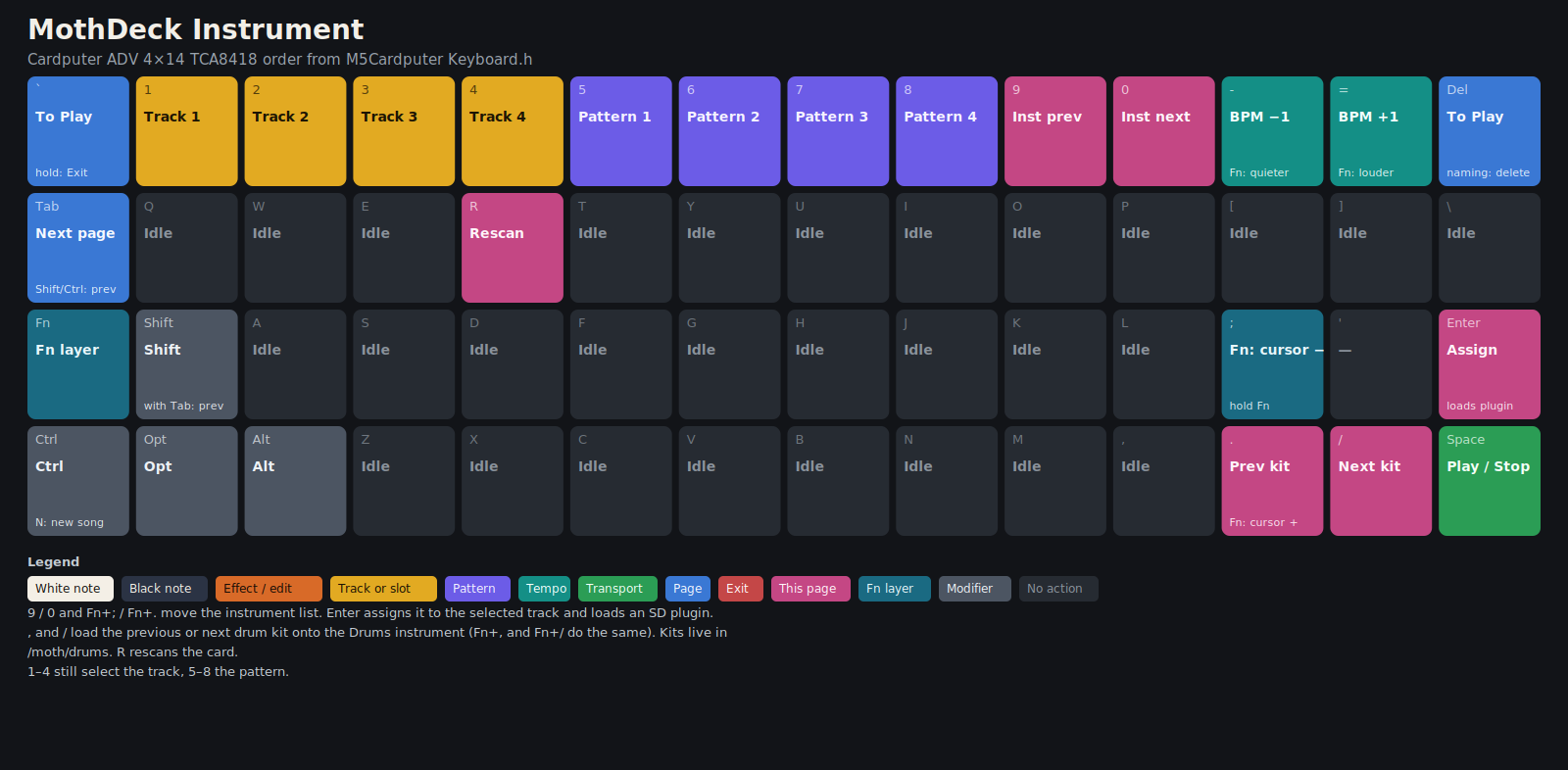
- SD patches A folder can be a patch of a sound that already exists, with scale, a held arp, a second oscillator, and glide. Enter on the Instrument page assigns it.
- Lean samples Unsigned 8-bit mono at 22050 Hz, about 22 KB/s. The mix stays 44100 Hz.
Flash it
Earphones or headphones required. The internal speaker on the Cardputer ADV does not work with this firmware. Listen on the 3.5 mm jack.
Install mothdeck-cardputer-adv.bin from Launcher. The full button sequence is in releases/INSTALL.md.
- Copy the application image (the file that starts with
E9) to a FAT32 microSD card. Do not install the full-flash image from Launcher. - Boot Launcher, press Enter on its splash, open the SD browser, and install that file.
- The next boot that follows the boot selection starts MothDeck: backlight, a one-second amber moth, then Play.
Unzip mothdeck-sd-pack.zip onto the card root when you want the extra kits, loops, sample instruments, and patches. Checksums are in SHA256SUMS.
1.2.12
Version 1.2.12 is the Cardputer image to flash. The application image is 1,235,872 bytes, SHA-256 9b98e52296c0634d2577b3fa6f98c0125cec331b60e1f9f07e440d255c90aa24. It has not been tried on a Cardputer. Use earphones. It includes 1.2.2 through 1.2.11. External tempo follows the incoming ticks. MothBoot stays 0.1.2. MothDiag 0.1.6 is in the same notes: the changelog, the user guide, and install notes.
- External sync Tempo is the tick count over the timestamps. 80–138 land on that integer, and a jump up to 180 shows within about two beats. The deck BPM is the fallback only when the clock is thinned.
- Live MIDI The event ring is 48 slots. A note-on older than 40 ms is dropped. Channels 1–16 play the four tracks, and each track keeps its own four voices.
statusanswers with DTR and RTS low. - MothDiag 0.1.6 Stats add
clock_hz, the raw clock bytes per second. The clock line shows the musical rate and the raw rate.
1.2.11
1.2.11 is included in the 1.2.12 image. The application image was 1,234,896 bytes, SHA-256 41e11c020debcad6608a8251cd7e06e5834faf6fad3df9e0acde942a3b400cc5. It has not been tried on a Cardputer. Use earphones. It includes 1.2.2 through 1.2.10. External sync locks to a full-rate clock and to a thinned one.
- External sync A smoothed tempo follows a full-rate clock or a thinned one. Duplicate clocks and a sub-tick burst do not race the playhead.
- USB serial
status,help, andversionanswer on MothDeck's port. Opening the port does not reboot the board.diag.py --flashsendslauncherwhen an app is running. - MothDiag 0.1.5 Clocks are counted in the BLE callback. MIDI BPM handles the 13-bit timestamp wrap and repeated timestamps. The screen clock rate is the musical rate.
1.2.10
1.2.10 is included in the 1.2.12 image. Its application image was 1,234,096 bytes, SHA-256 f7f72e51ec2c5ea37c947b32f52bfb5eb642bc148f2ed78afc8f813ac34b279d. The hardware check of that image went well. Use earphones. It includes 1.2.2 through 1.2.9. Sending launcher returns to MothBoot.
- MothBoot
launcherrestarts into MothBoot on the USB-Serial-JTAG port. Uploads through MothBoot 0.1.1 ack each chunk, anddiag.pydraws a progress bar. - MothDiag 0.1.4 Status, help, stats, and command replies are always sent. The capture banner shows the version from the log.
1.2.9
1.2.9 is included in the 1.2.10 image. Its application image was 1,233,936 bytes, SHA-256 f3542da19084462aeb2f7358f51c1c65adb28d67e2737c930346d6c01e16d509. It has not been tried on a Cardputer. Use earphones. It includes 1.2.2 through 1.2.8.
- Sync Settings has Internal, External, and Transport. External scales a thinned BLE clock against the current BPM. Transport follows start and stop and keeps the deck BPM.
- MTC Quarter frames can run the transport. When their spacing matches the rate in the message, the playhead seeks.
1.2.8
1.2.8 is included in the 1.2.9 image. Its application image was 1,230,816 bytes, SHA-256 4a95e55c2b194d3ab6f9db23dd3dc234c0578a4c92cd7a08b7e7c5b038ac9f71. It has not been tried on a Cardputer. Use earphones. It includes 1.2.2 through 1.2.7.
- Clock An external clock follows the master from 40 to 200 BPM, including several clocks that share one timestamp. The short-interval request stays pending until the link is 15 ms or faster.
- Notes A note-on that arrives with a dense clock still sounds. A status after a clock is the note, and a note-on waits behind note-offs instead of being dropped.
- USB MIDI The USB port is a MIDI device named Mothdeck and still a serial port. Unplugging it releases live notes. The MIDI page shows
USB MIDIorUSB off.
1.2.7
1.2.7 is included in the 1.2.8 image. Its application image was 1,158,480 bytes, SHA-256 a27de5ad535ab37efe058298e70aac2f4cfa5d27e5128ee04ab0975fc29472d1.
- Gate With Rec on, note-off stores the hold as 1 to 4 steps in the length bits the piano roll already uses. The song file does not change. Rec off still only plays.
- Quantize The note lands on the step that just played. Halfway through the step it rounds forward. The end of the pattern wraps to step 0 of that same pattern.
1.2.6
1.2.6 is included in the 1.2.8 image. Its application image was 1,157,632 bytes, SHA-256 2987446d5dc03265aee849aad1fdb5b696137812b7e85f35b008973ab0796e3a.
- Clock counter MIDI clocks are counted instead of taking a queue slot each. A burst leaves room for the notes in that packet. Start, Continue, Stop, and Song Position stay in order. Ticks before Start in the same packet are not counted.
- Quiet connect The production build does not print from the connect callbacks. Pairing, the advertising packet, and the interval request are unchanged.
1.2.5
1.2.5 is included in the 1.2.6 image. Its application image was 1,157,024 bytes, SHA-256 7d51c26422d82fc3fb5c5aa269a0f65338749e0f8db30d84bd0e00027909e867.
- Live notes Stop, and a dropped Bluetooth link, release live MIDI notes. The pattern, loops, and sampler keep going. CC 120 and CC 123 release the channel that sent them. A note-off finds the track that sounded the note.
- Queue Clocks, then controllers, then note-ons give up slots. Note-offs and transport stay in order. Continue keeps the current step and the clocks that arrived after Song Position. An external clock clamps at 200 BPM.
- Status Settings has no counter line. Fn+D on the MIDI page opens Status and Backspace closes it. A tonal note with no note-off releases after a long run of steps. The default is 192.
1.2.2 through 1.2.4
Those versions stay published, and 1.2.8 supersedes them. The 1.2.4 application image was 1,153,504 bytes, SHA-256 014b2e089b5383d32a5628147f6571bff5c0c9f470a3f89b681a36508e21eea1.
- 1.2.2 — BLE stays resident NimBLE is reserved at boot, before the loop windows. Turning it on starts advertising and does not allocate, so it does not fail for lack of a free block. Unload BLE skips the stack on the next boot and frees that block for a large loop library. The toast says
BLE unloads after restart. - 1.2.3 — Rec off only plays Incoming MIDI notes sound and are not written into the pattern while Rec is off. Space turns Rec on, and then they record at the playhead. MIDI Start and Continue do not arm Rec.
- 1.2.4 — clock, polyphony, dropped notes Every clock in a BLE packet counts, including several
0xF8bytes that share one timestamp. Six clocks advance one 16th. The BPM is smoothed over a beat and tracks from 40 to 200. A track sounds up to four notes at once. A fifth replaces the oldest. Note-off, including velocity 0, releases only the matching note and channel. Notes in one packet each get a voice. Extra clocks are dropped when the queue is nearly full, so a chord behind them is kept.
LilyGO TTGO T8
A separate port of MothDeck 1.2.4 runs on a LilyGO TTGO T8 V1.8. It lives on the ttgo-t8 branch and is not merged into main. The Cardputer files on this page are a different binary. Do not flash a TTGO image onto a Cardputer, or the Cardputer image onto a T8.
The pre-release is ttgo-t8-v1.2.4. Wiring, the menu, and the two images are in docs/TTGO-T8.md on that branch.
- PSRAM The T8 is an ESP32-WROVER with 4MB of PSRAM. Loop windows, samples, the pattern grid, chord notes, and the tracker sit there, so BLE and loops stay loaded together.
- Chords A step holds up to four notes. The first stays in the song file. The other three are stored in PSRAM and drawn as extra blocks in the piano roll.
- 4×4 keypad A membrane keypad mounted with the connector on top. The top-left key is key 0. The menu is the original MothSynth function-key layout, and every MothDeck page is reachable from those 16 keys.
- ST7789 and audio The stock image drives an ST7789 240×135. Sound is a PCM5102A over I2S, with a second image that uses the internal 8-bit DAC on GPIO25.
Not tried on hardware. The TTGO 1.2.4 images have not been flashed, and the keys have not been pressed. The Cardputer 1.2.12, MothBoot 0.1.2, and MothDiag 0.1.6 images have not been tried on a Cardputer. The 1.2.10 hardware check went well.
On the keyboard
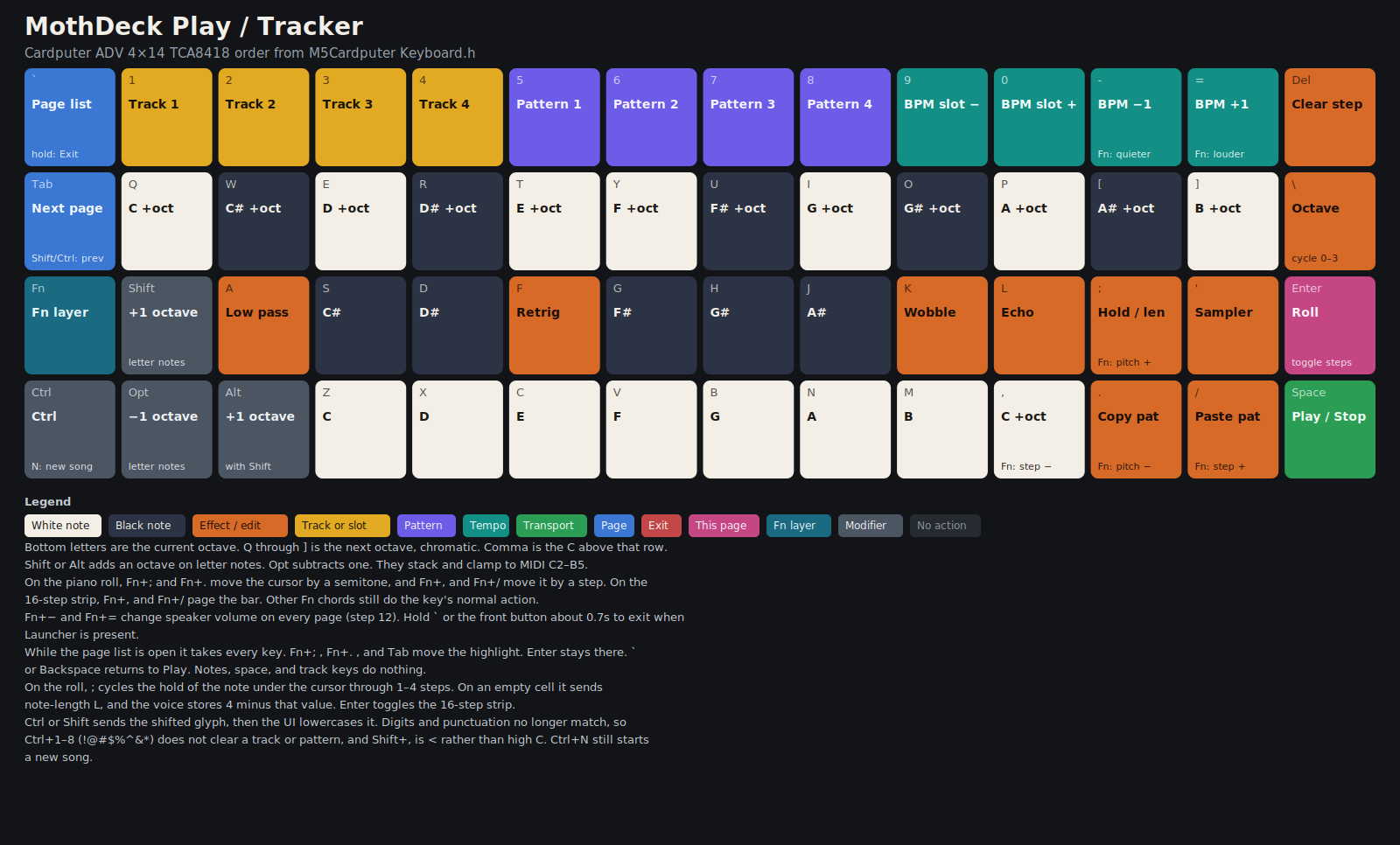
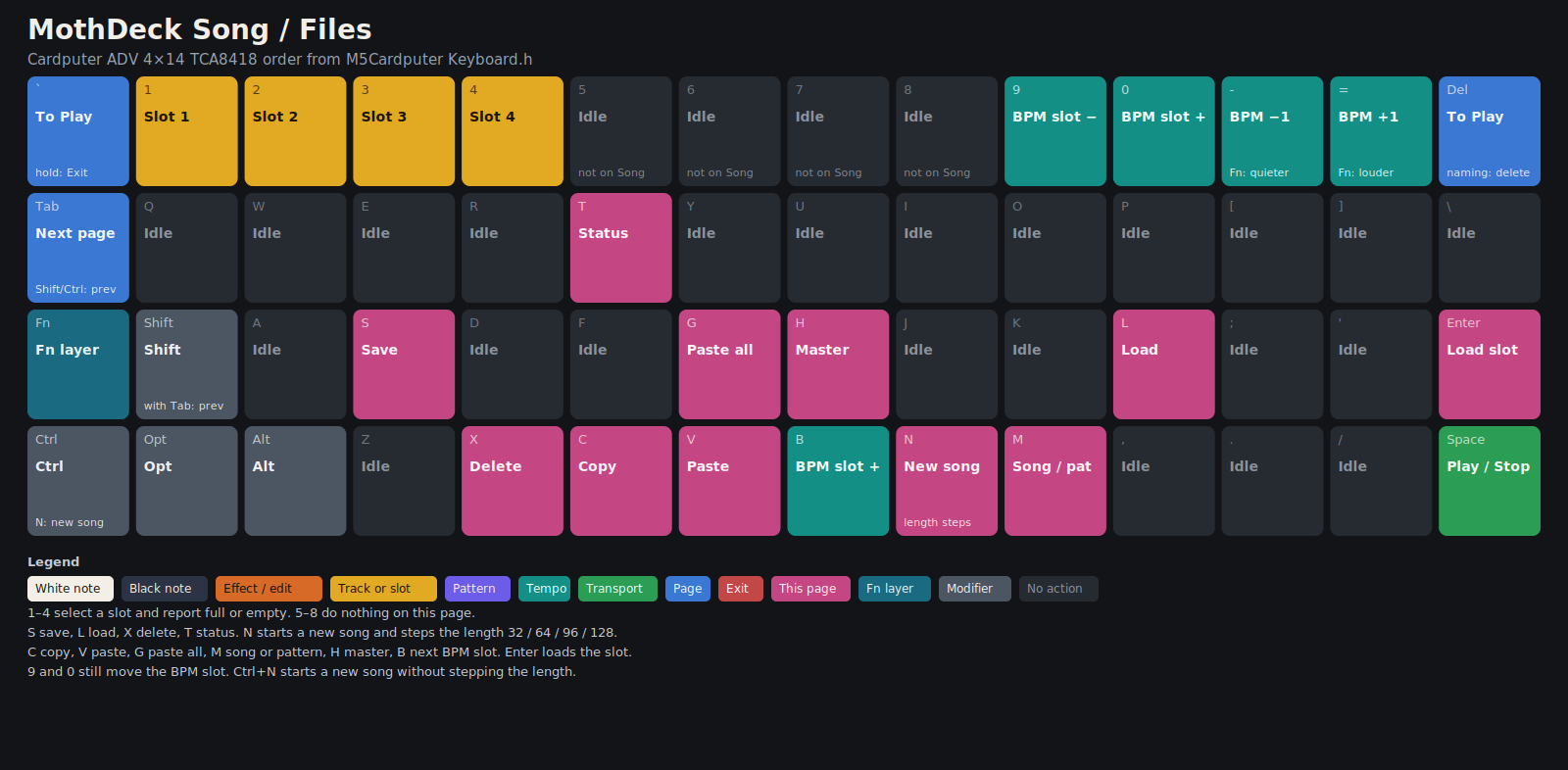
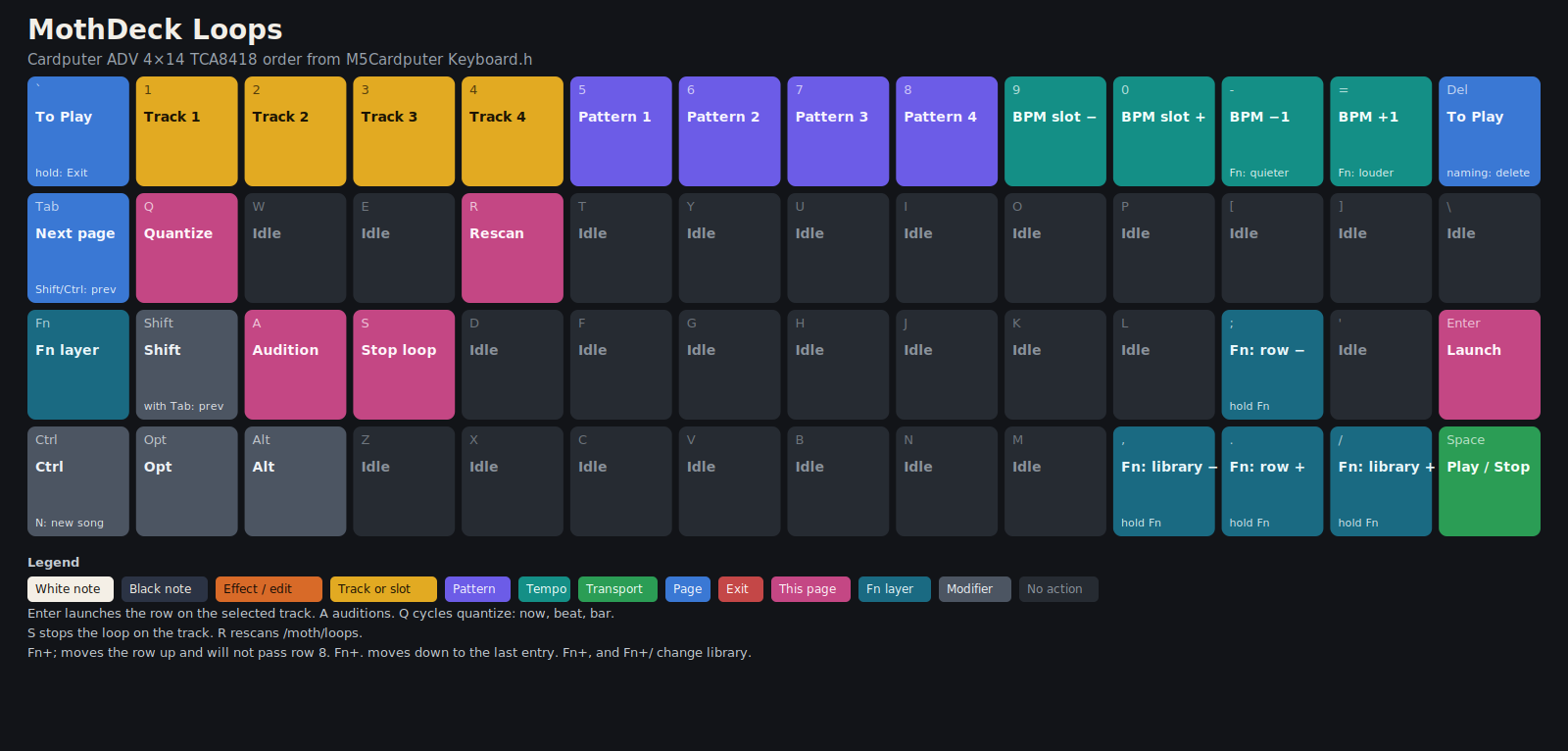
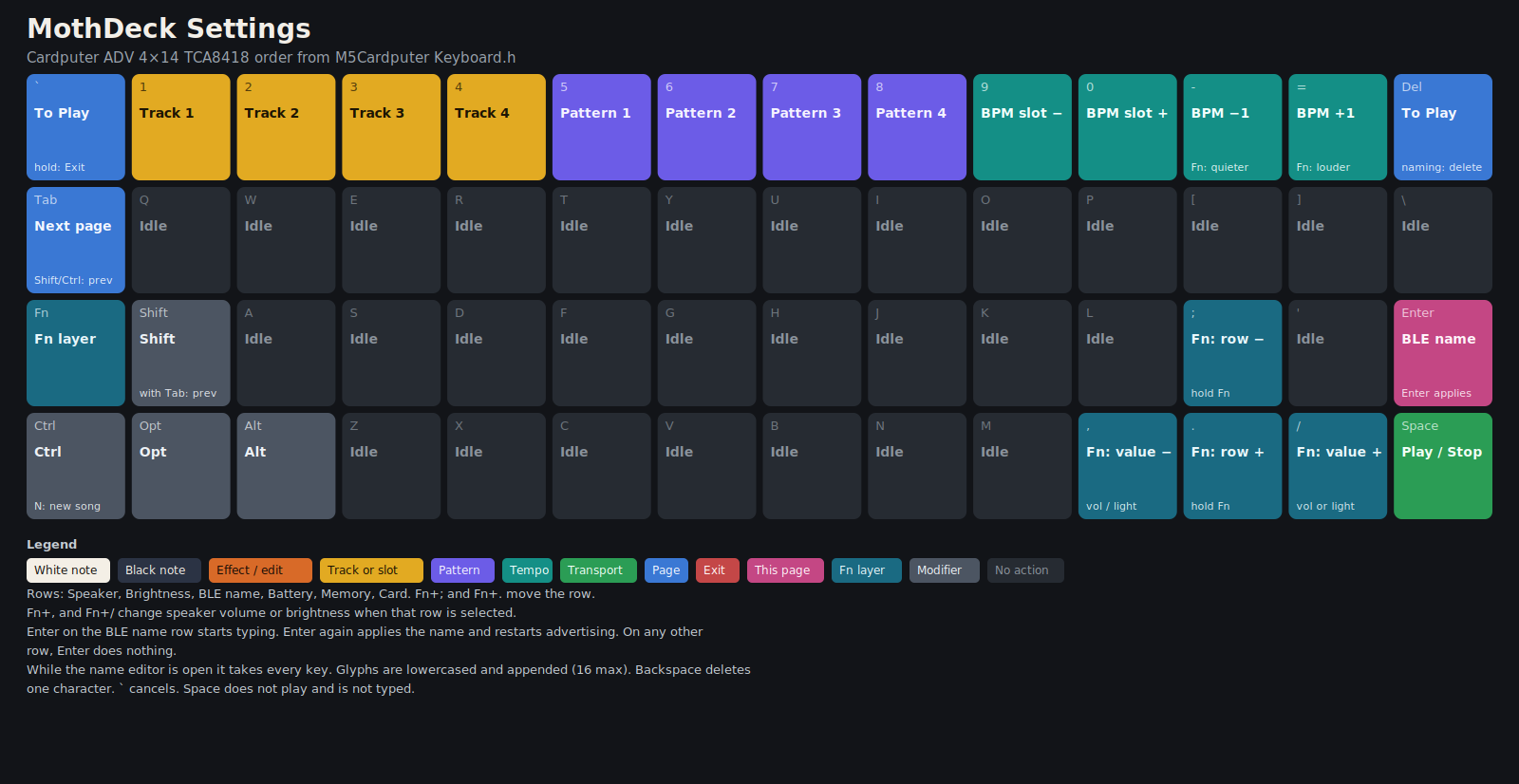
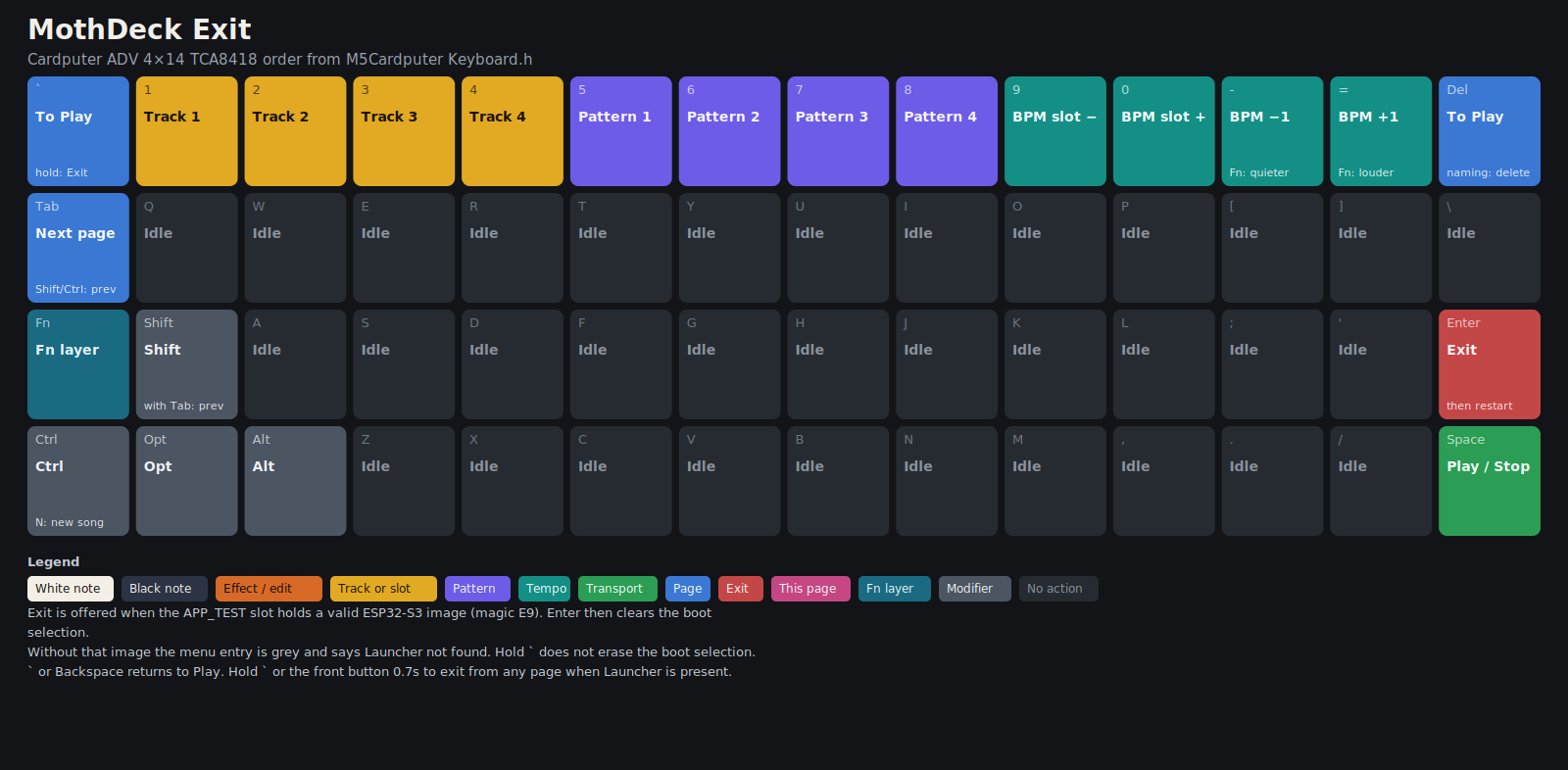
Tab moves through Play, Instrument, FX, Mixer, Song, Loops, MIDI, Settings, and Exit. On the Instrument page, comma and slash load the previous and next drum kit from /moth/drums. Hold Esc (the grave key) or the front button for about 0.7 seconds to return to Launcher, and only when a real Launcher image is present.
Key drawings: Play, Instrument, FX, Mixer, Song, Loops, MIDI, Settings, Exit. Page notes and screenshots are in USER-GUIDE.md. File layouts are in FORMATS.md.